How to create AI baseball stadium videos: Step-by-step guide with realistic prompts
A new artificial intelligence (AI) trend has surged over social media platforms like Instagram and X (formerly Twitter).
To follow the trend, users are inserting themselves into live baseball broadcasts with startling realism.
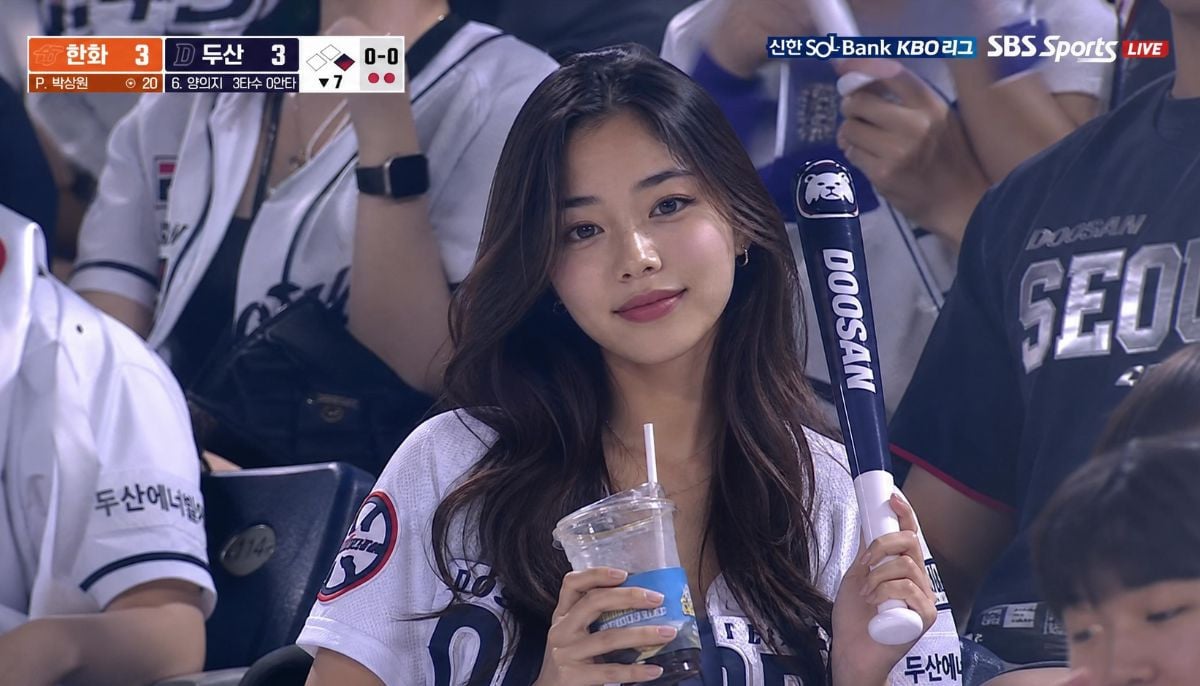
Users are massively turning their photos into candid-looking videos of people cheering in a packed baseball stadium.
The trend started when an X user @kangminlee shared a video on May 2, where a Korean woman seemingly caught unaware by a live broadcast camera.
The post with the caption “The average Korean woman” went viral, but viewers realized that the lip was entirely AI-generated.
Soon after, a wave of such videos is seen on social media.
Step-by-step guide for the Korean AI baseball trend
To hop onto the trend, users need to follow simple steps.
First upload clear portrait photos to ChatGPT or Google Gemini.
Enter this prompt:
“Create a realistic KBO baseball broadcast screenshot of a person based on my uploaded photo. Keep their face exactly the same — no changes to face shape, eyes, nose, lips, skin tone, or hair. The person is sitting in a crowded Korean baseball stadium, holding a drink and a cheering stick. They are wearing a white baseball jersey over a casual top. They are looking at the game, not posing for the camera. Style: 16:9 horizontal, TV broadcast look, telephoto lens compression, mild motion blur in crowd, stadium lighting, natural skin texture, slight video compression noise, candid framing. Background: full stadium seats with cheering Korean fans, bright lights, out-of-focus LED boards. Do NOT beautify, smooth skin, enlarge eyes, or make them look like an AI model. Must look like a real accidental broadcast capture.”
Video Generation Prompt (Google Flow / KLINGAI):
“4-5 second continuous live sports broadcast clip, 16:9, 1080p. Subject is the person from the uploaded image, sitting in a KBO baseball stadium crowd. Action sequence: [0-1 sec], Notices the camera, face lights up with a genuine smile, [1-3 sec], Makes direct eye contact, raises hand and waves enthusiastically, [3-5 sec], Continues waving and laughing naturally. Background: lively Korean crowd cheering, clapping, waving thundersticks. Slight motion blur on background. Camera: telephoto broadcast lens, slight micro-shake, shallow depth of field. Faint "LIVE" graphic in corner. Do NOT change the person's face, hairstyle, or identity. No stylization. Realistic skin texture only.”
The same prompts can be adapted for Formula 1 races and concerts. Swap “race” and “concert” with stadium.