How to setup WhatsApp multi-account feature on iPhone in new update?
WhatsApp multi-account features expand to more iPhone users
Published June 12, 2026
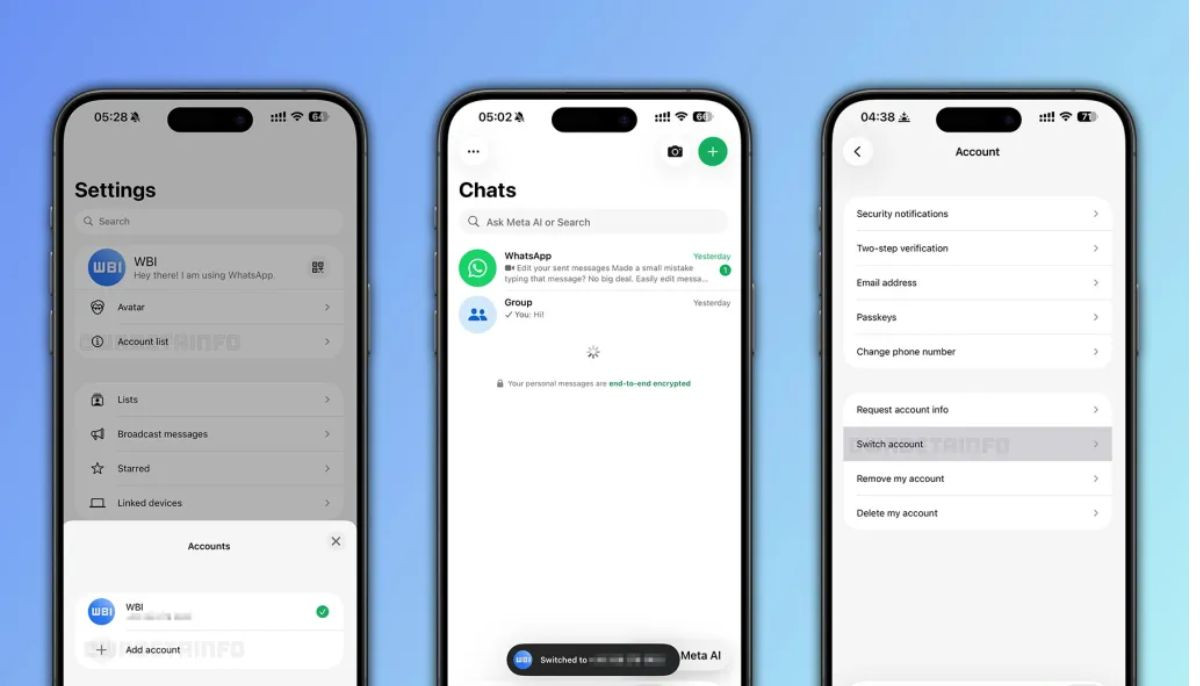
WhatsApp has finally expanded its multi-account support for iPhone users after years of delay.
This new feature enables users to manage two separate accounts within the same app.
The highly anticipated feature started beta testing last November and is now available for the standard App Store version of WhatsApp.
To activate the feature, follow these simple steps:
- Update WhatsApp to the latest version on your iPhone.
- Open the app, go to the bottom right corner, and tap “You” in the settings tab.
- Select the drop-down arrow or plus icon (+) appear right next to your name.
- Tap “Add Account.”
- Accept the terms and conditions and continue.
- Choose your country and enter the second phone number.
- Enter the verification code received through SMS or phone call.
- Set up your second profile with a name and photo.
- Tap “Next.”
The new rollout is phased. Not all users can access the feature immediately. However, the company reports that all iPhone users can access the feature in approximately seven months.